MHub Accounting: Major Updates for Better Accuracy and Efficiency

Our latest Accounting release introduces new tools and refinements designed to make your financial workflows smoother, more compliant, and less manual. Here’s what’s new this month.

📑 Recurring Journal – New Screens, Automation & Control

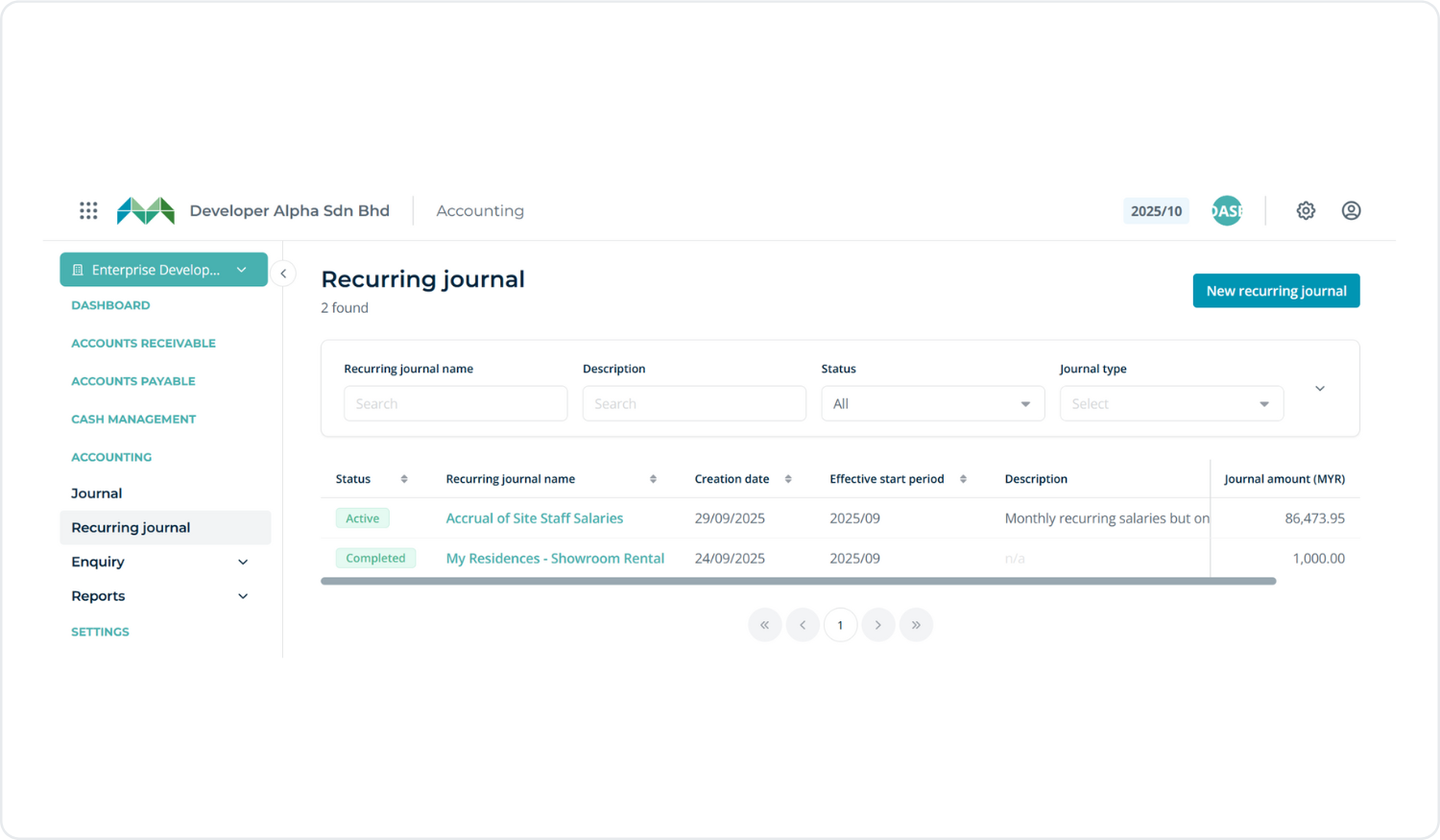
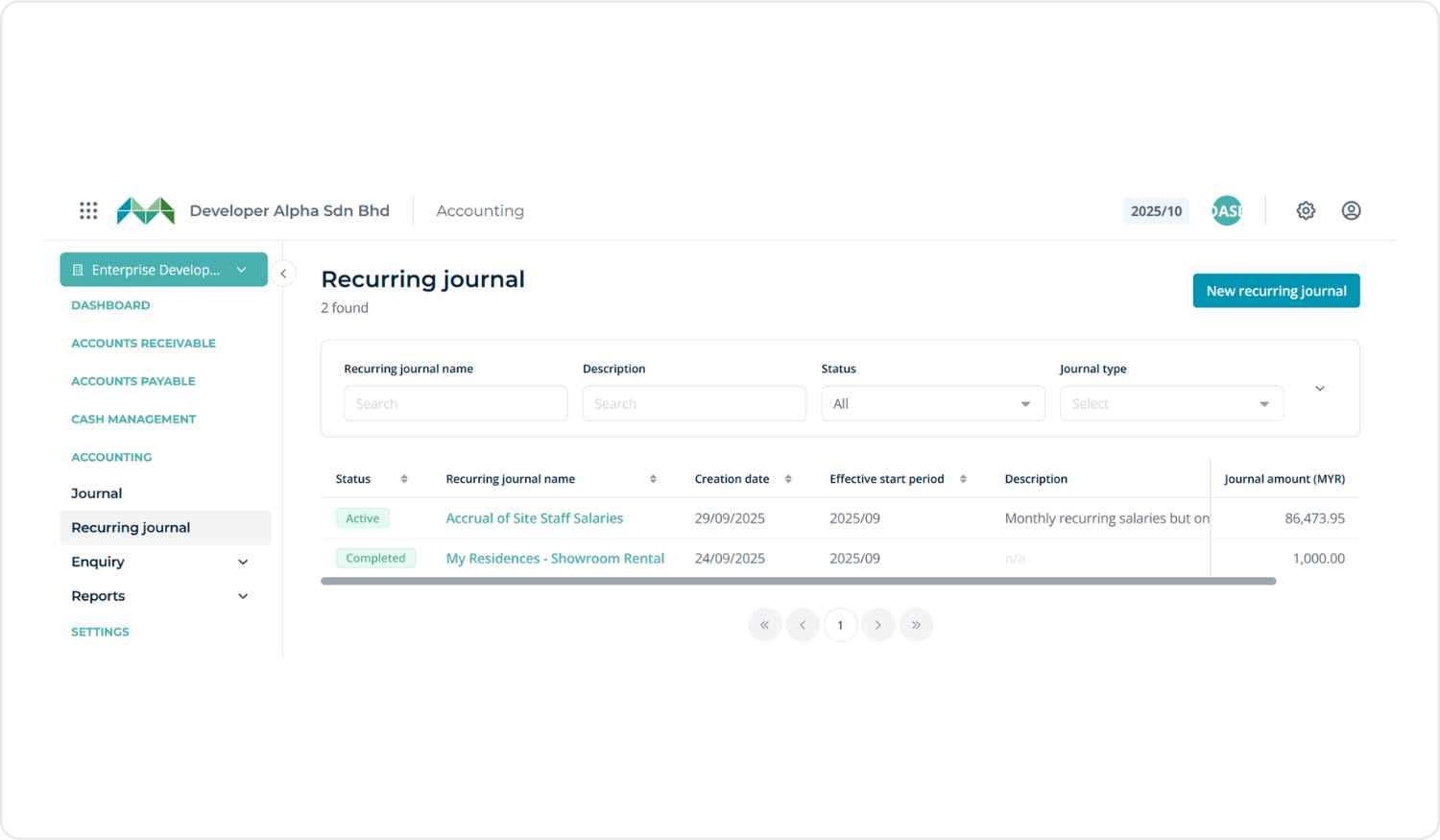
We’ve introduced comprehensive management of recurring journals with 3 new screens:

  • Listing page – View and manage all recurring journal templates
  • Detail page – See full setup and configuration for each template
  • New template creation – Create and configure new recurring journal templates

You can access this via:
Accounting → Recurring Journal
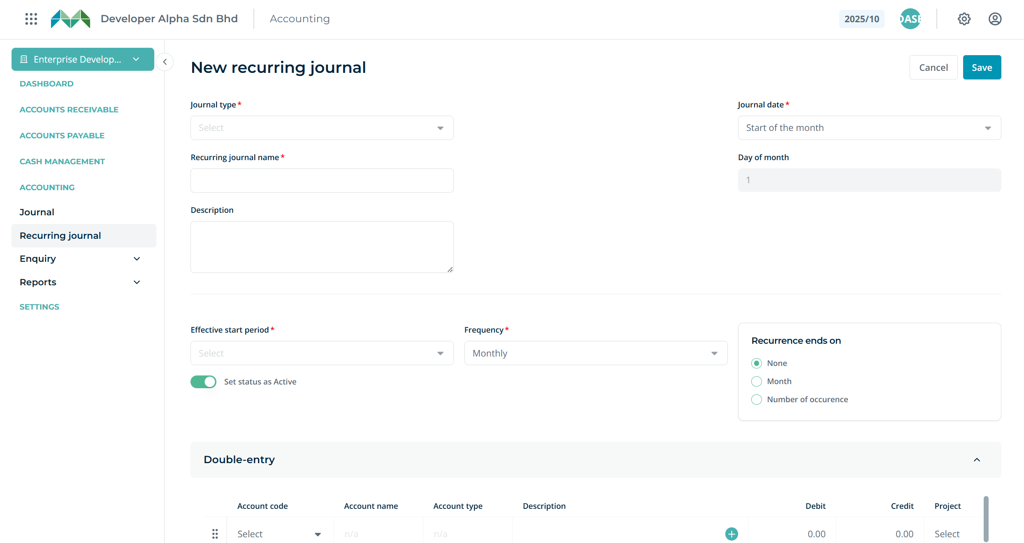
Allows users to create a new recurring journal template by defining key details such as Journal type, Journal date, and frequency by setting an effective start period and specify recurrence ending conditions.

From here, you can:

  • Create recurring journal templates with a defined schedule
    – e.g. monthly, quarterly, or yearly
  • Automatically generate journal entries based on those templates
  • Use backend APIs that power automated generation in the background
  • Control who can manage these templates using role-based permissions

This significantly reduces manual work and ensures consistent handling of recurring transactions across your books.
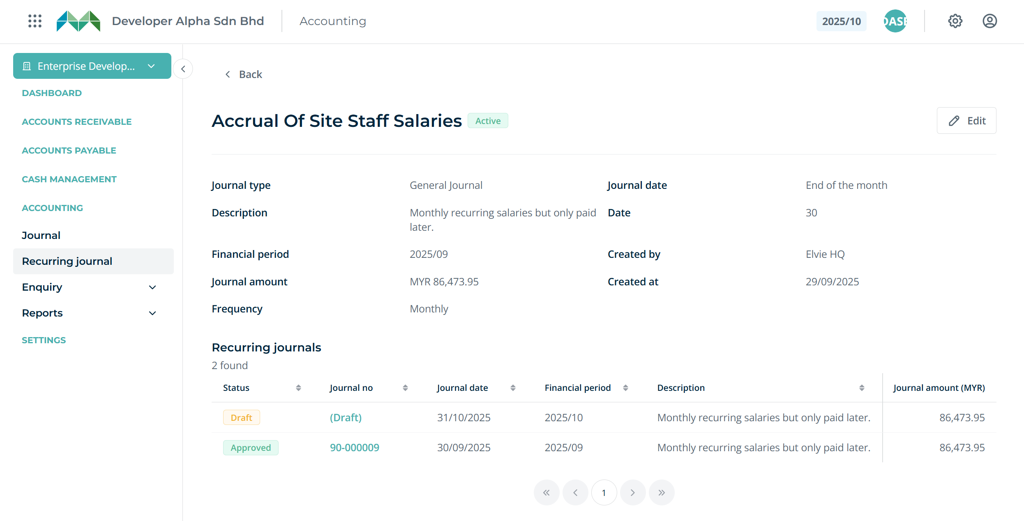
Displays the list of journals generated from this template, providing a quick overview of their statuses and allowing users to easily identify journals that remain in draft.

💰 AP Retention Sum – End-to-End Retention Handling

This feature enables withholding a percentage of payments until project completion. The release includes full retention handling from invoice posting through release via Debit Note, along with the addition of retention amounts in the Creditor Aging Report.

Ensure that the account code for Retention is properly set up. The retention amount will be charged based on the creditor type.
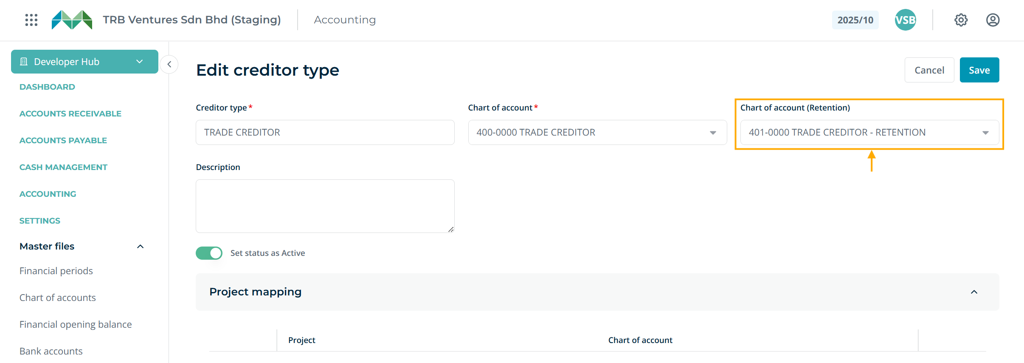
Setup Chart of account (Retention) for the creditor type

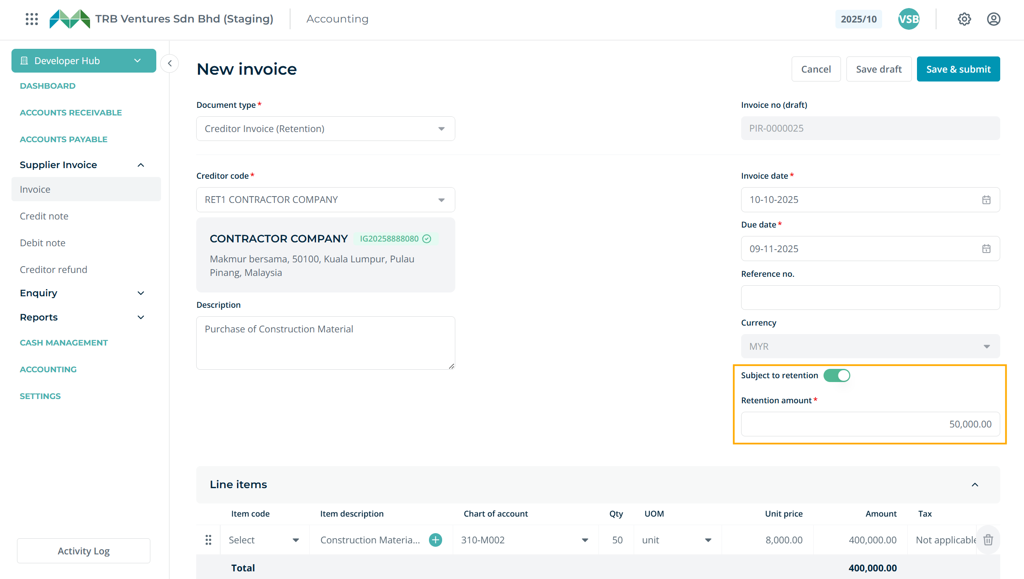
“Subject to retention” option

Depending on the creditor type, you can enable the “Subject to retention” option to specify the retention amount to be withheld. This amount will be excluded from the Net Payable of the invoice, while the e-Invoice will be submitted using the total invoice amount.
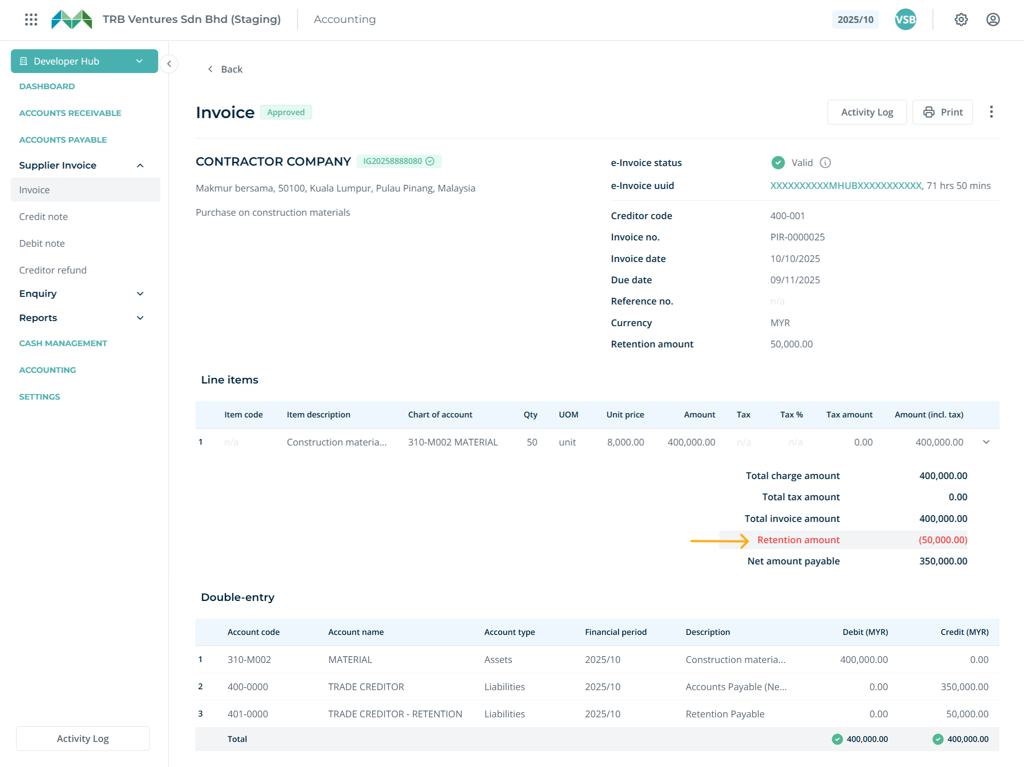
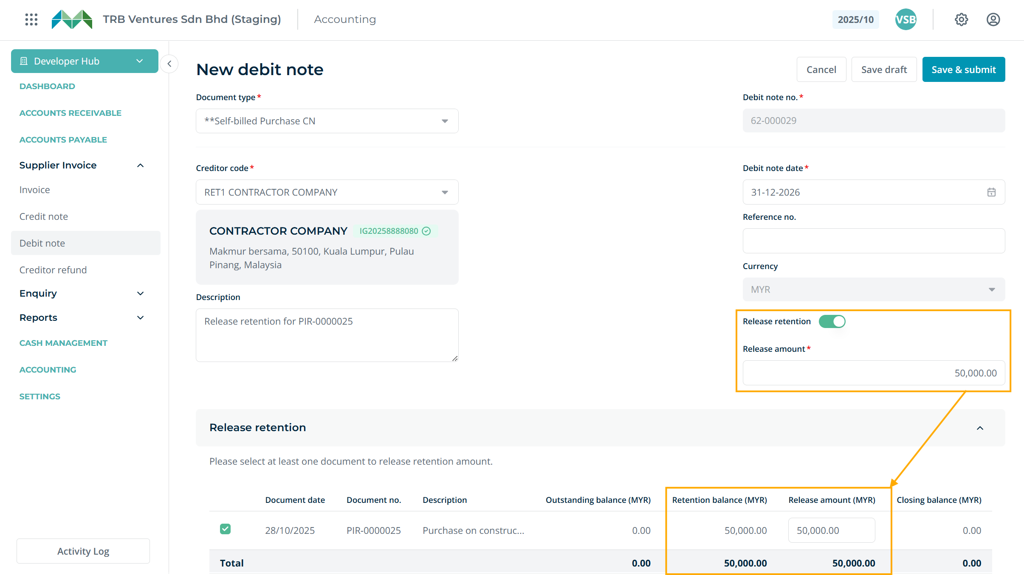
Retention amount shown on the summary

Use AP Debit Note to release the retained amount once the project or contractual conditions are fulfilled.

Added Retention and Total Outstanding (with Retention) in the Creditor Aging Report for clearer visibility of payables.

🔒 COA editing is disabled

For several important reasons, mostly related to accounting integrity, audit compliance, and system controls, account codes in approved journals should not be editable.

We have implemented this check in the journal module to ensure accuracy and maintain the integrity of financial records.
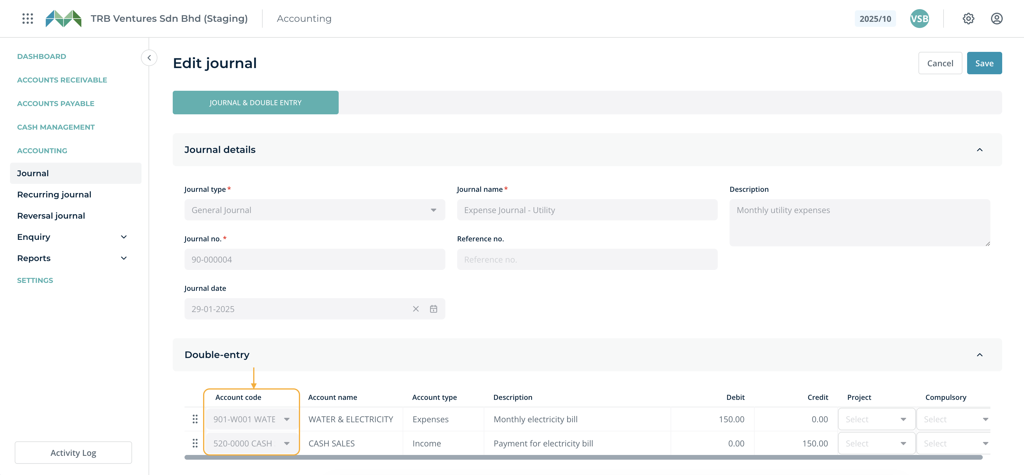
Account codes cannot be edited once the journal has been approved.

🧾 Compulsory Analysis Code
Introduced a compulsory setting for analysis codes based on the selected COA configured in this section. When creating entries, the system will validate that the analysis code is entered only if the COA for the line item is defined in this setting.

This ensures data consistency and enforces accurate reporting by preventing incomplete or incorrect account allocations.
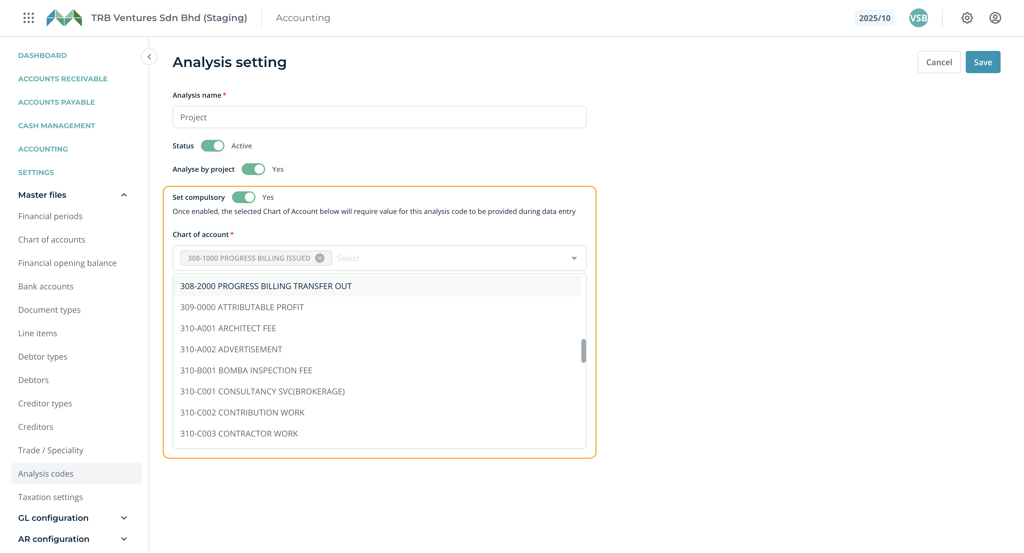
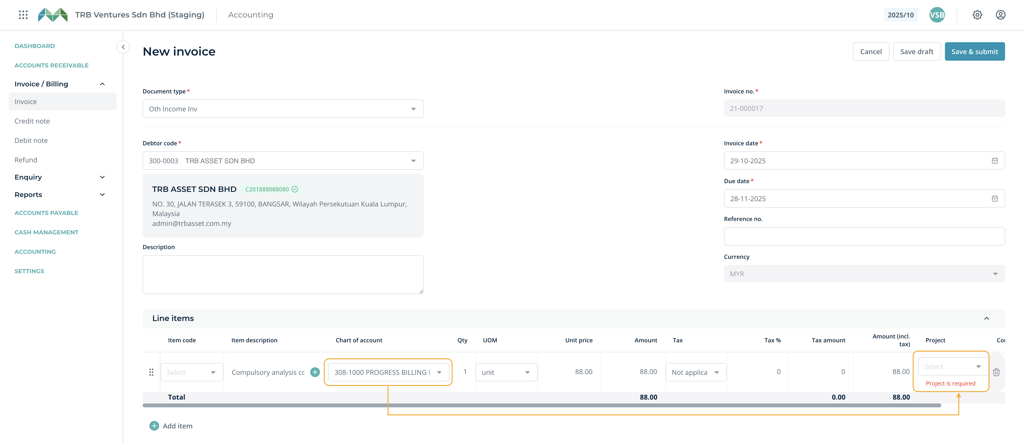
Analysis code setting - Set compulsory

Now validation dynamically follows the selected COA of the line item.

Support for Negative Line Item Amounts

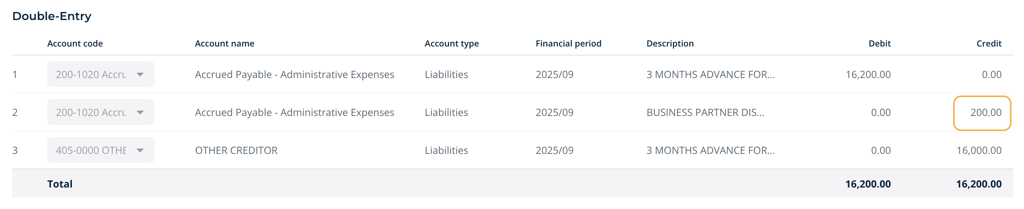
This feature allows negative line item amounts to be entered, which are automatically posted to the opposite side in double-entry accounting. It is particularly useful for recording discounts, adjustments, or offsetting entries without the need to create separate documents.
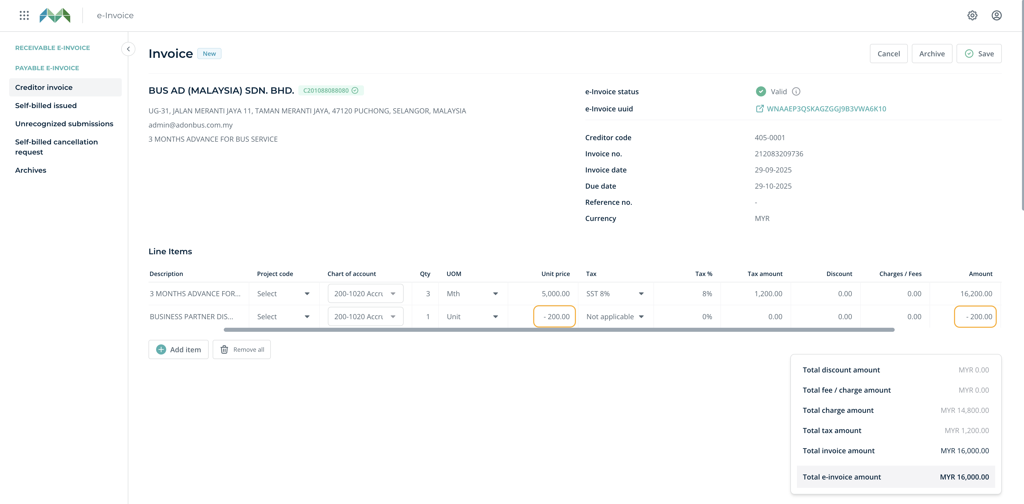
Supplier e-Invoices containing negative line item amounts can now be saved into the Accounting module.

Negative line item correctly posted to the opposite side, reducing accrued payable.

🛠️ Bug Fixes – Improvements to reports and UI

⚠️ Sorry for any inconvenience caused during deployment. Thank you for your understanding and continued support! 🙏

🎉 Fresh UI Update

The Showroom interface just got a lot friendlier with small but powerful upgrades that make everyday tasks smoother and more visual.
asdfasfsfasfsdf

  • Pin your favourite projects: You can now pin up to 6 projects to the top of your Project Page for quick access.
  • Easier booking navigation: The Booking List now highlights the transaction row you’re browsing — making it easier to track your current selection.
  • New Customer List View: View all customers in a clean list format for easier browsing and management.
  • Auto-close date selector: The calendar pop-up will now auto-close once a date is selected.
  • New Property Category: Added “Service Apartment” to the property type dropdown.
  • Loan Margin sorting: Loan Margin % in the Sold pop-up is now arranged from high to low for quicker reference.

👍 Functional Improvements

Several quality-of-life improvements are now live to make bookings, validation, and buyer details handling even smoother.

  • Credit Check: The page and function have been moved to CRM (hidden from Showroom).
  • Generic TIN Support: Now allowed for individual buyers using passport or military ID.
  • Foreign Company Checkbox: Added during booking — this lets the Generic TIN autofill automatically for validation.
  • Custom Field Format Validation: You can now set custom input fields with validation to ensure data is keyed in according to your preferred format.
  • Approved Date Selection: You can now choose the Approved Date when changing a status to Booked.
  • SPA Signing & Stamping Dates: Editing is now enabled in Edit Booking.

📈 Report & Activity Log Enhancements

We’ve expanded activity tracking and reporting to give HQ users and project teams deeper visibility into system usage and booking actions.

  • Added Users and Business Unit tabs to Activity Logs (Homepage) for HQ role.
  • Added Activity Logs for Business Unit page.
  • Added “Booking Cancellation Reason” to Booking Report.
  • Added Created At, Last Login At, and Last Updated columns in Users (Excel/CSV export).
  • Added Search Filter to Activity Logs.
  • Improved User Activity Logs to include all actions with proper naming conventions for better tracking.

⭐ New Advanced Print Form Templater

We’ve upgraded the Print Form Template system to give you more flexibility and accuracy in document generation.

  • Updated the Merge-tag Dictionary & How-To Guide to include all new additions.
  • Added Compare Latest Date function.
  • Added merge-tags related to Banker and Lawyer fields.
  • Updated file naming format for template downloads:

<booking_code> - <template_name>.pdf

  • Cleaned up custom field merge-tags containing unsupported symbols.

🔗 Showroom ↔ Credit Control Integration

We’ve enhanced how Showroom connects with Credit Control to ensure data consistency between booking and financial stages.

  • Added SPA Signing Date&Stamping Date during status change to Sold.
  • Prevented purchaser changes once a unit is marked as Sold.
  • Disabled pricing-related edits when a unit is already Sold.

🧑Performance

  • Improved loading speed in the Aging by Banker report for a smoother reporting experience.

🐞 Bug Fixes

A long list of small but meaningful fixes to keep things running smoothly:

  • Basic Siteplan’ user role can no longer select unavailable units.
  • Booking Activity Logs now show date comparisons correctly (old vs new).
  • Fixed issue where customers with NRIC were incorrectly created under ID Number type.
  • Disable Base Selling Price’ toggle now works properly.
  • Unit Import now shows correct notifications when incorrect files are uploaded.
  • Hide Price’ option in Storey Plan now functions as expected.
  • Scheduled Pricing Package now respects your timezone settings.
  • Free Item can now be added to SubTotal under Pricing Package without error.
  • SPA Value is now calculated correctly based on the original Unit Price, even if the Pricing Package was later edited.

WhatsApp